Joins your video calls, listens, takes notes, and speaks up when addressed by name. Afterwards: a structured summary, decisions made, and action items — sent automatically.
In this guide: how Atona joins meetings, what it does while it's there, and what you and the other participants can expect.
What it does
Add Atona to a meeting and it joins as a participant — visible, named, with its own identity. It listens to the conversation, takes structured notes, and responds when someone addresses it by name ("Atona, when's our next launch?").
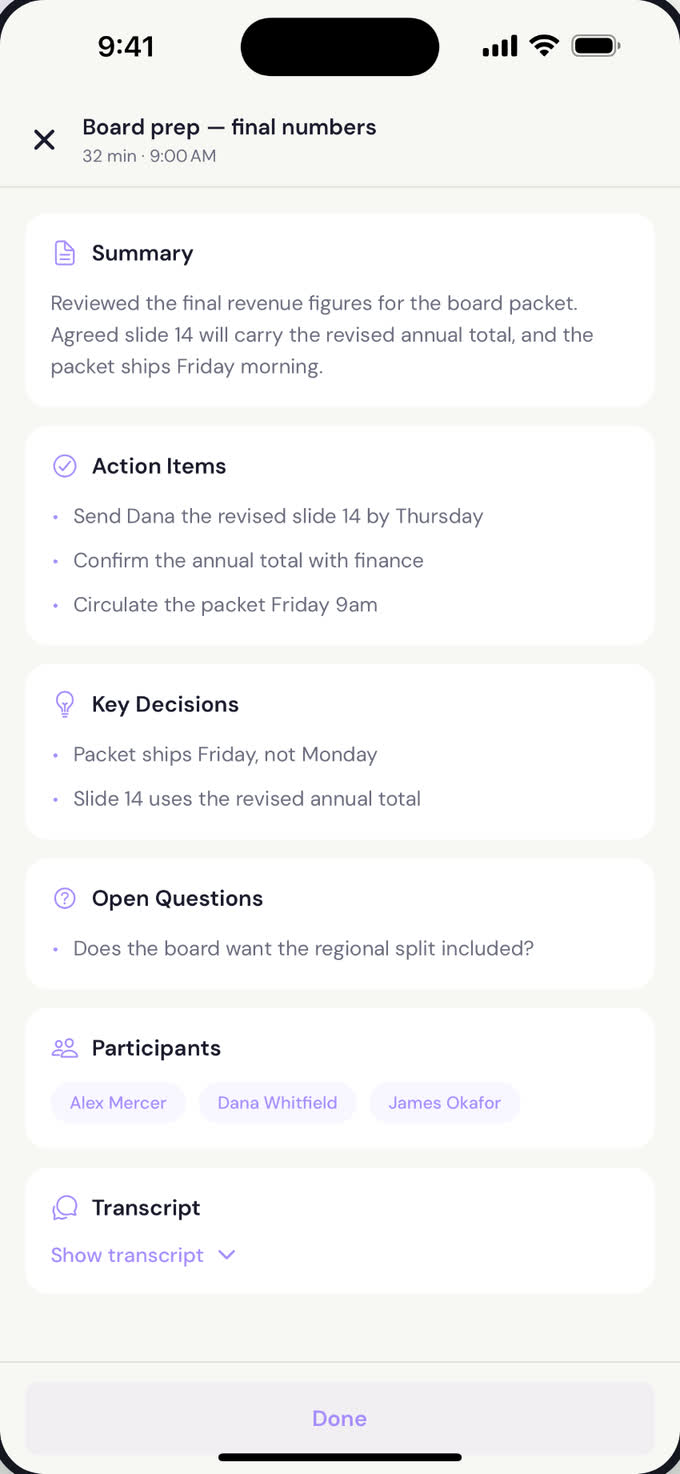
After the meeting ends, you get a clean summary in your morning brief — what was decided, what's outstanding, who owes what. Everything joins your one cross-channel memory, so the next email about the project picks up exactly where the meeting left off.
What lands after the call. Summary, action items, decisions, open questions and participants — with the transcript kept underneath if you want the exact words.Atona for iOS
Try saying
Before, during, or after — anything you'd ask a human notetaker.
"
Join my 2 o'clock with Sarah.
"
What did we decide in this morning's meeting?
"
Send Sarah a summary and the action items.
"
Add Atona to all my recurring 1:1s.
How it works
1
Invite or ask Atona to join
Add Atona to a calendar invite, or ask it to join in chat. It joins on time as a named participant — never silently.
2
It listens and transcribes
Atona follows the conversation in real time. It tracks decisions, action items, and questions as they come up.
3
It speaks when addressed
Say its name and it answers — pull up a number, schedule a follow-up, look up a contact. Otherwise it stays quiet.
4
Afterwards: structured notes
You get a summary, action items per person, and a record that joins your cross-channel memory. The next time anyone in the meeting comes up, Atona remembers.
What you control
Auto-join rules
Have Atona join everything, only recurring meetings, only 1:1s, or only when you ask.
Voice on or off
Atona can be a silent notetaker or an active participant. Toggle per meeting.
Sensitive meetings
Mark a meeting confidential and Atona won't join — no exceptions.
Summary recipients
Choose who gets the post-meeting notes — just you, the whole room, or a custom list.
What Atona will not do
Join silently. Atona always appears as a named participant — everyone in the meeting knows it's there.
Speak unless someone addresses it by name. No interrupting, no unsolicited input.
Join meetings you've marked confidential.
Share meeting content with anyone outside the meeting unless you explicitly ask.
Common questions
Does it record the meeting?
Atona transcribes the meeting so you have a written record. Audio is not retained beyond the transcript. Everything lives in your private space and ages out on the same schedule as the rest of your memory.
Can other participants see it?
Yes — Atona joins as a named participant with its own video tile. It's never invisible. Anyone in the meeting can see it's there.
What if I don't want it in a meeting?
Mark the meeting confidential, or just don't invite it. You can also remove it mid-meeting like any other participant.
Does it work with Zoom, Meet, and Teams?
Yes — Atona joins all three.
Where do the notes go?
Into your morning brief, into your one cross-channel memory, and (if you choose) sent to the other participants by email.