Atona/How it works/Morning brief
Morning brief

Your morning brief.

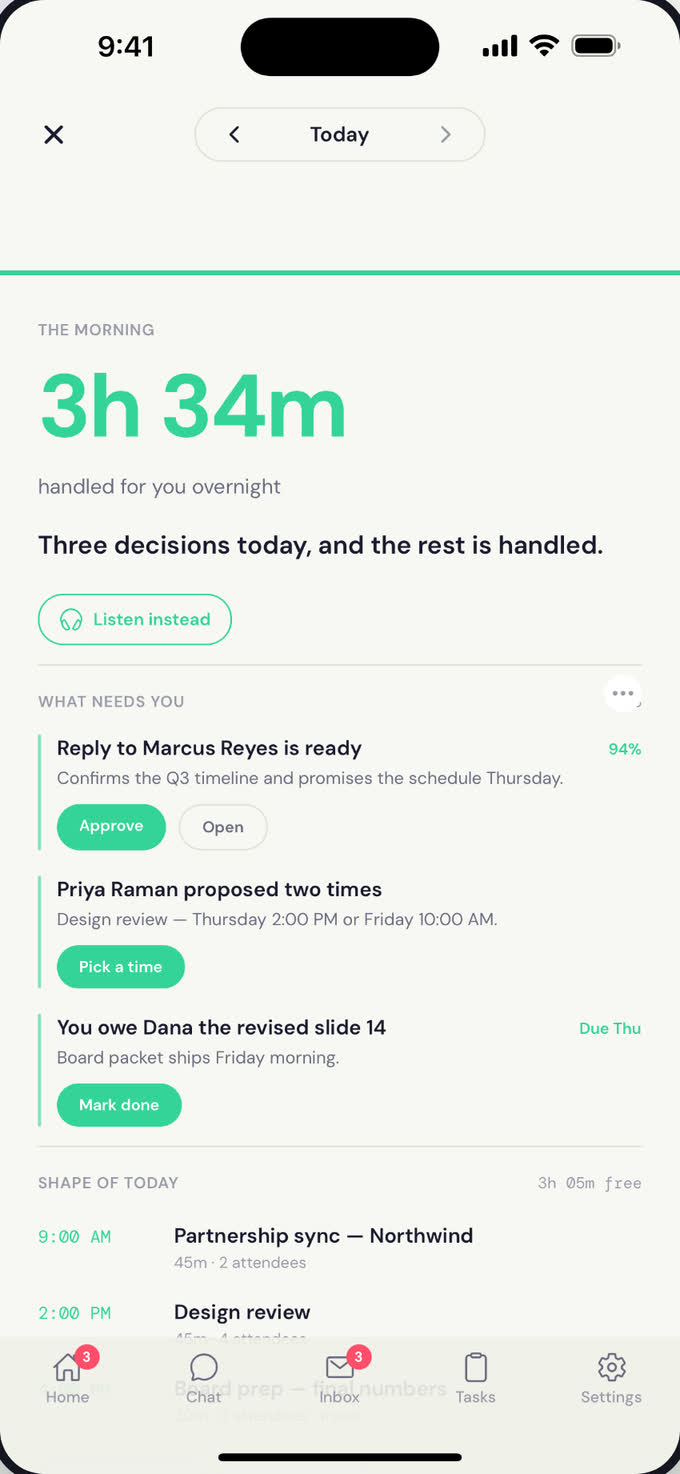
A short, focused read every morning: inbox, calendar, weather, commute, and what Atona handled overnight. Delivered before you're out of bed.

In this guide: what's in the brief, how to customize it, and the evening recap.

What it does

Every morning, Atona reads everything that happened overnight, decides what matters, and writes you a short brief. No firehose, no notification spam — just the things you need to know to start the day.

You can also opt into an evening recap: a short read at the end of the day with what got handled, what's outstanding, and what tomorrow looks like.

Atona · Morning Brief 7:42 AM
Good morning, Tayo.

Try saying

The brief is configurable in plain language.

"

Brief me before 7 every morning.

"

Add commute time and weather to my brief.

"

Skip tomorrow's brief — I'm off.

"

Send me an evening recap too.

How it works

1

Atona reads everything overnight

Inbox, calendar, anything that came in across every channel. Sensitive content is filtered out before any AI sees it.

2

It decides what matters

Not everything is briefable. Atona picks the items that need your attention or change how your day looks.

3

It composes the brief

Short, scannable, in your voice. Weather, calendar, inbox highlights, what got handled, what needs your call.

4

It lands on your schedule

By email, push notification, or both — whenever you've asked for it. Most people get it before they're out of bed.

What you control

Time

When the brief lands. Different on weekdays vs weekends if you want.

Sections

Add or remove weather, commute, flights, meetings, inbox highlights, action items.

Channel

Email, push notification, or both. Whichever you'll actually read.

Evening recap

Optional end-of-day read with what got handled and what tomorrow looks like.

What Atona will not do

Common questions

What's actually in the brief?

Whatever you've asked for. Defaults are: weather, commute, today's calendar, anything Atona handled overnight, drafts waiting for your call, and any urgent action items. You can add or remove any of these.

What about weekends?

You can set a different time, a shorter format, or skip weekends entirely.

Can I get an evening one too?

Yes — opt into the evening recap and you'll get a short end-of-day read with what got handled and a preview of tomorrow.

What if there's nothing to report?

The brief is short. Atona won't pad it with filler — if there's nothing to say, it just says good morning and gets out of your way.

Where does the brief come from?

Your dedicated assistant email address — same as the rest of Atona's outbound mail.

Related guides

Ready to try Atona?

Free during private beta.

Get early access